Linux Lite began in 2012 as one person's answer to a simple problem: Windows was getting heavier, old computers were being thrown away, and Linux felt too hard for ordinary people. Fourteen years later it is still here, still light, and still aimed at beginners.
This is the full story — every version from 1.0 to 8.2, what each release changed, and how a small fork of Ubuntu became one of the best-known lightweight distributions in the world.
Every version in this history sits on an Ubuntu LTS (long-term support) base.
The Beginning: 1.0 Amethyst (2012)
Linux Lite started in October 2012 as a fork of Ubuntu, with one goal: a "lite" version that is easy to use and light on resources. The first release was version 1.0, codenamed Amethyst.
It was built on Ubuntu 12.04 LTS with the Xfce 4.8 desktop. The idea was simple — take Ubuntu's stability and software, strip away the weight, and present it in a desktop that a Windows user could understand at a glance.
Early reviews praised exactly that. The first review, of version 1.0.4 in January 2013, tested whether the project lived up to its own aims: simple, fast and free. It did. The project quickly gained a following among users frustrated with Windows bloat and the complexity of other Linux distributions.
The Early Years: 2.x and 3.x (2014–2016)
Version 2.0 arrived as a beta in May 2014, followed by 2.2 in December 2014. These releases stayed on the Ubuntu 14.04 LTS base and refined the formula: a familiar desktop, a small set of custom tools, and a focus on old hardware.
Version 2.6 and 2.8, released in 2015 and 2016, brought the Lite Installer and the Lite Control Centre, and reviewers noted how close the system had come to matching Linux Mint for old hardware. The main criticism at the time was the lack of UEFI support — the installer could not boot on newer UEFI-only machines.
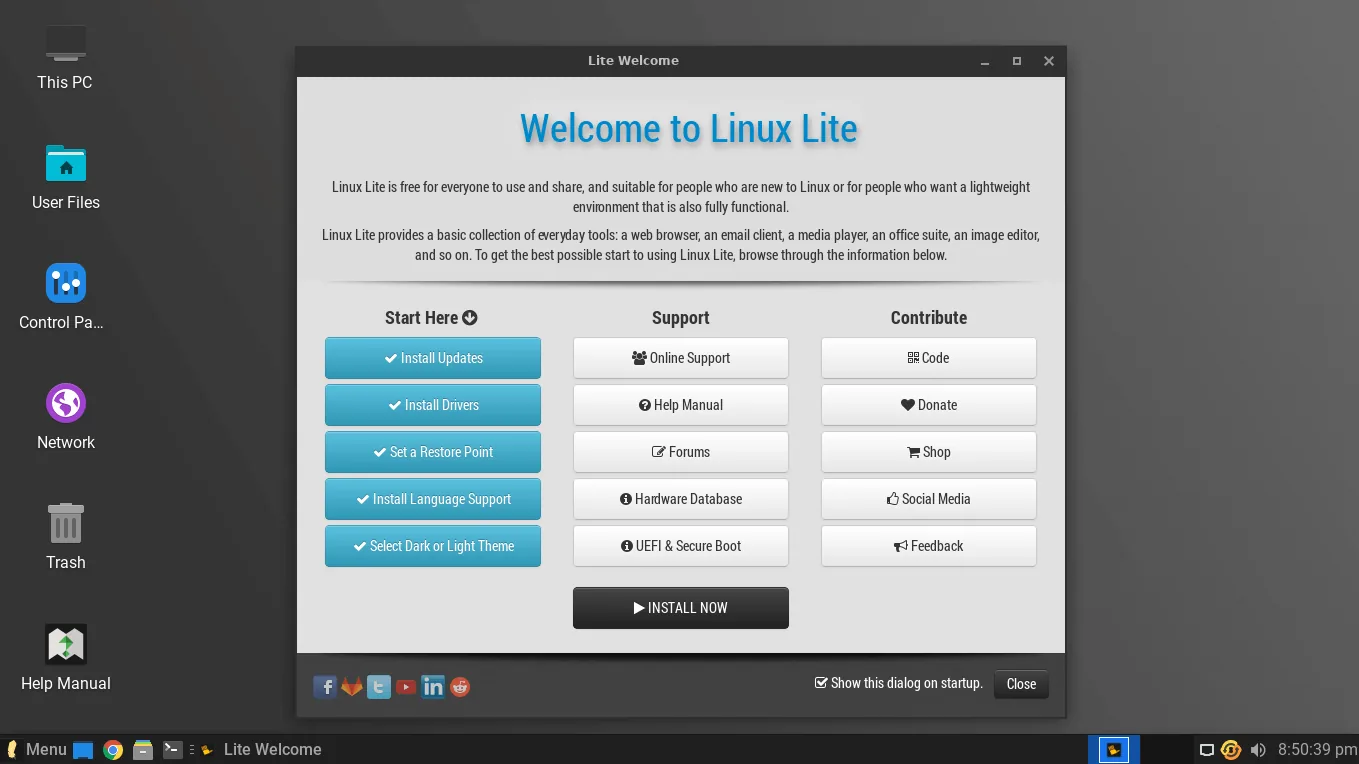
Linux Lite 3.0, released on 1 June 2016, moved to Ubuntu 16.04 LTS with Xfce 4.12. A hands-on review tested it on a 2009 Sony VAIO with a 1.86 GHz Pentium and 2 GB of RAM, and called it the ideal platform for old hardware and new users. The Welcome screen, Lite Software and the built-in Help Manual were already the features reviewers praised most.
What the early versions established
Three things from the early years never changed. First, Linux Lite follows Ubuntu's LTS cycle, which means long-term support and security updates with every major release. Second, it ships a complete set of everyday applications, not a bare minimum. Third, it is built for Windows switchers first — the desktop, the tools and the documentation all assume the user has never seen Linux before.
Growing Up: 4.x (2018–2020)
Linux Lite 4.0, released on 1 June 2018, was based on Ubuntu 18.04 LTS. It brought a brand-new look with the Adapta theme, and it dropped the 32-bit ISO — from here on, Linux Lite was 64-bit only.
Version 4.6 followed in September 2019. Then came 4.8, released on 14 January 2020, one day before Windows 7 reached its end of life. The timing was no accident. Linux Lite 4.8 was pitched directly at Windows 7 users whose computers could not, or should not, move to Windows 10.
Reviewers and news sites framed 4.8 as a Windows 7 alternative: same Ubuntu 18.04.3 base, a familiar desktop, and hardware requirements far below Windows 10. It was the release that put Linux Lite in front of a much wider audience.
The 5.x Series: UEFI Arrives (2020–2022)
Linux Lite 5.0, codenamed Emerald, was released on 31 May 2020 on the Ubuntu 20.04 LTS base. It was a major release, and it fixed the oldest complaint about the distribution: it added UEFI support out of the box.
Version 5.2 followed in October 2020, and was reviewed as the best alternative operating system for older hardware. Version 5.4 arrived in April 2021, and 5.6 in September 2021, which introduced a "pay what you want" download model.
Version 5.8, released on 1 February 2022, added Neofetch, refreshed the Papirus icon theme, and bundled new wallpapers. It also added Mintstick, a simple tool for writing ISO images to USB sticks. Reviews of 5.2 and 5.8 praised the desktop, the application selection and the system requirements, and both noted how little the system asked of old hardware.
The 6.x Series: A New Look (2022–2023)
Linux Lite 6.0, released on 1 June 2022, moved to Ubuntu 22.04 LTS with Xfce 4.16. It brought the Materia window theme and accessibility improvements — and one controversial change: Google Chrome replaced Firefox as the default browser.
Version 6.2, released on 1 November 2022, replaced OpenShot with Shotcut for video editing and changed how Lite Upgrade worked. Version 6.4, released on 31 March 2023, improved Thunderbird and adopted Zstd compression so application updates downloaded faster.
Version 6.6, released on 4 September 2023, added support for 22 new languages and an AI helper tool linked from the Welcome app — an early sign of the AI features that would grow in later releases. It still relied on Xfce 4.16, but the desktop and the tools around it kept getting more polished.
The 7.x Series: Galena (2024–2026)
Linux Lite 7.0, codenamed Galena, was released on 1 June 2024 on the Ubuntu 24.04 LTS base with Xfce 4.18. It dropped Snap packages entirely, and it was reviewed as the best lightweight Linux operating system of 2025.
Version 7.0 opened the Galena series, and every 7.x release that followed stayed on the Ubuntu 24.04 LTS base.
Version 7.2, released on 31 October 2024, added Lite AI Support and a Lite Theme Manager. Version 7.4 arrived on 1 April 2025 with kernel 6.8 and interface tweaks. Version 7.6, released on 31 August 2025, added a new community Wiki and updated applications including LibreOffice 25.8.
Version 7.8, released in early 2026 on Ubuntu 24.04.3 LTS, was a different kind of release. Twelve of the project's own applications were rewritten, many ported to GTK4, improving stability and the user experience. It was a minor update from 7.6, focused on bug fixes, LTS updates and code optimisations — but the rewrites underneath it were the foundation for what came next.
The 7.x series in one line
Series 7 took Linux Lite from a good lightweight distribution to a polished one: modern desktop, no Snap, its own tools rewritten, and a community around it. It also set up the biggest change in the project's history.
The 8.x Series: Hematite — The Big Rebuild (2026)
Linux Lite 8.0, codenamed Hematite, was released on 1 June 2026. It was the biggest rebuild in the project's history, moving to Ubuntu 26.04 LTS with Xfce 4.20.
Series 8 replaced the old installer with Calamares, made Firefox the default browser again, removed Snap and Flatpak, and added a Lite Game Center and a local AI assistant called MyAI. Fifteen in-house applications were rewritten, the whole desktop was translated into 22 languages, and the ISO was slimmed to 2.36 GB.
Version 8.2, released on 31 October 2026, keeps that foundation and adds two custom Linux 7.3 kernels: a desktop kernel for everyday use and a gaming kernel that reduces input lag for games and audio work. It also improves the installer, the driver manager and the game center.
Version 8.2 is the latest version of Linux Lite, so this history ends where the download page begins.
A hands-on review of 8.0 noted that the system felt lighter and more focused than before: Firefox back as the default, a faster installer, and a desktop that finally matched the project's name.
Release Timeline
| Version | Release date | Ubuntu base | Main change |
|---|---|---|---|
| 1.0 Amethyst | October 2012 | 12.04 LTS | First release |
| 1.0.8 | January 2014 | 12.04 LTS | Early fixes |
| 2.0 | May 2014 | 14.04 LTS | Beta of the 2.x series |
| 2.2 | December 2014 | 14.04 LTS | Refinement |
| 2.6 / 2.8 | 2015–2016 | 14.04 LTS | Lite Installer, Control Centre |
| 3.0 | June 2016 | 16.04 LTS | Xfce 4.12, old-hardware focus |
| 4.0 | June 2018 | 18.04 LTS | New look, 64-bit only |
| 4.6 | September 2019 | 18.04 LTS | Refinement |
| 4.8 | January 2020 | 18.04.3 LTS | Windows 7 alternative |
| 5.0 Emerald | May 2020 | 20.04 LTS | UEFI support |
| 5.2 | October 2020 | 20.04.1 LTS | Polished 5.x release |
| 5.4 | April 2021 | 20.04.2 LTS | Refinement |
| 5.6 | September 2021 | 20.04.3 LTS | Pay-what-you-want download |
| 5.8 | February 2022 | 20.04.1 LTS | Neofetch, Mintstick |
| 6.0 | June 2022 | 22.04 LTS | Materia theme, Chrome default |
| 6.2 | November 2022 | 22.04.1 LTS | Shotcut replaces OpenShot |
| 6.4 | March 2023 | 22.04.2 LTS | Zstd app packaging |
| 6.6 | September 2023 | 22.04 LTS | 22 languages, AI helper |
| 7.0 Galena | June 2024 | 24.04 LTS | Xfce 4.18, Snap dropped |
| 7.2 | October 2024 | 24.04 LTS | Lite AI Support, Theme Manager |
| 7.4 | April 2025 | 24.04.2 LTS | Kernel 6.8 |
| 7.6 | August 2025 | 24.04 LTS | Community Wiki |
| 7.8 | Early 2026 | 24.04.3 LTS | GTK4 rewrites, 12 apps rebuilt |
| 8.0 Hematite | June 2026 | 26.04 LTS | Calamares, MyAI, Game Center |
| 8.2 | October 2026 | 26.04.1 LTS | Kernel 7.3, gaming kernel |
What Changed Most Over 14 Years?
The hardware requirements went up, not down. In 2016, Linux Lite asked for a 700 MHz processor and 512 MB of RAM. Today it asks for a 1.5 GHz dual-core CPU and 4 GB of RAM. The project did not get heavier for no reason. The desktop is fuller and more modern, with more applications and more features.
What did not change is the goal. Every version, from 1.0 to 8.2, is built for the same person: someone new to Linux, on a computer that the rest of the industry has written off. The desktop still looks familiar, the tools still do one job each, and the documentation is still written in plain language.
The project also grew up around its users. The forums have been viewed more than 91 million times, there is a built-in Help Manual, and a Discord server for real-time help. More than 18 million downloads later, Linux Lite is still a small team building for beginners.
FAQs
When was Linux Lite first released?
Version 1.0, codenamed Amethyst, was released in October 2012, based on Ubuntu 12.04 LTS with the Xfce 4.8 desktop.
What is the latest version of Linux Lite?
Linux Lite 8.2 Final, released on 31 October 2026. It is built on Ubuntu 26.04.1 LTS with the Linux 7.3 kernel.
What was the biggest change in Linux Lite history?
Series 8 (version 8.0, June 2026). It replaced the installer with Calamares, brought back Firefox, removed Snap and Flatpak, and added the Lite Game Center and the MyAI local AI assistant.
When did Linux Lite get UEFI support?
Version 5.0, released in May 2020. Earlier versions could not boot on UEFI-only machines. Note that Secure Boot is still not supported — it must be disabled before installing.
Why did Linux Lite drop 32-bit support?
Version 4.0 (June 2018) dropped the 32-bit ISO. Linux Lite is 64-bit only, and there is no official ARM version.
Can I still use an old version like 7.8?
You can, but there is no reason to. Version 8.2 is the current release, and 7.x users can upgrade in place with the Lite Upgrade tool.
Conclusion
Fourteen years, twenty-five releases, and one idea that never changed: Linux should be simple, light, and welcoming to people who have never used it. From a small Ubuntu fork in 2012 to a polished system with its own tools, its own kernels and its own AI assistant in 2026, Linux Lite grew without losing its purpose.
If you are running an old version, the upgrade path is there. If you have never tried it, version 8.2 is the best place to start — it is the most complete Linux Lite ever made, and it is still free.